Submenu By Front Page Screenshots


Video Tutorial


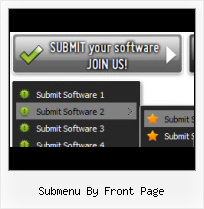
The Vista Buttons add-in for Expression Web and Frontpage allows you to create powerful dropdown menu menus, directly in Expression Web, FrontPage 2000 (version 9), Microsoft FrontPage 2002 (version 10), Microsoft Office FrontPage 2003 (version 11). Fully customizable appearance! Use one of the 500+ web buttons, 100 submenu designs, 6600+ icons, 50 ready-made samples, or create your own using the theme editor. With support for custom images, icons, colors, font styles, the possibilities are limitless. You'll create really nice looking website html menus and html buttons with little or no design skills at all! Create, insert, modify a website menu without leaving your favorite web development environment!


Menu, Button, and Icon Collection

Expression Web Menu provides huge collection of 1400 web buttons, 6600 icons, 300 ready-made samples, so you'll create really nice looking menus and buttons with little or nodesign skills at all! Web 2.0, Mac, iPhone, Aqua buttons, Vista, XP, transparent, round, glossy, metallic, 3d, tab menus, drop down menus will be a breeze!

Button and Icon Samples

Features

Insert button script into the existing HTML page
You can insert your button script into the existing HTML page. To do so, click "Page insert" button on the Toolbar.

Ready Menus For Front Page Ready to use button templates and submenus themes.
In the Themes toolbox you can choose selected buttons and submenu themes for web appearance.

Expression Web Tab Generator Widest cross-browser compatibility
The html menus generated by Expression Web Menu run perfectly on all old and new browsers, including IE5,6,7,8, Firefox, Opera, Safari and Chrome on PC, Mac, and Linux. Expression Web Menu menus have a structure based on HTML list of links (LI and UL tags), readable by any search-engine robots and text browsers.

Create Jump Box Expression Web 3 Submenu By Front Page Export graphic picture
Using Expression Web Menu you can save menu graphic picture as gif-files (*.gif).

Cost Effective
Stop paying month-to-month subscription to web image and icon collections! Don't waste your money on licenses for every new domain where you want to place the menu! Pay once, use for life, anywhere!

High Quality and Professional Results
You don't have to know HTML, JavaScript, CSS or any other coding languages to make multi-state rollover web buttons, professional cross-browser, search engine friendly DHTML menus. All you have to do is make some clicks and adjust buttons as you wish for them to appear. Vista Web Buttons will generate all necessary images, html, javascripts, css styles automatically!


2.0 Buttons by Web-Buttons.com v3.0.0

How to use Vista Buttons with FrontPage

    To install the dropdown menu into your html page you should do the following things:

    1). Create and save your buttons in any temp folder using Vista Buttons application. You canuse "Save as HTML" function.

    Save menu

    You can enter any name you like, for example enter "menu":

    Save menu name

    So you'll have menu.html file and "menu-files" folder with all menu files.

    Generated files

    2). You can add javascript dropdown menu to a single page or to many pages using Shared Borders, Include Page or Dynamic Web Template so that you won't have to add it into each page separately.

    Insert a dropdown menu to a single page in FrontPage

    - Start FrontPage and open the web page that you will be inserting the script into. When the page opens, it should look like this:
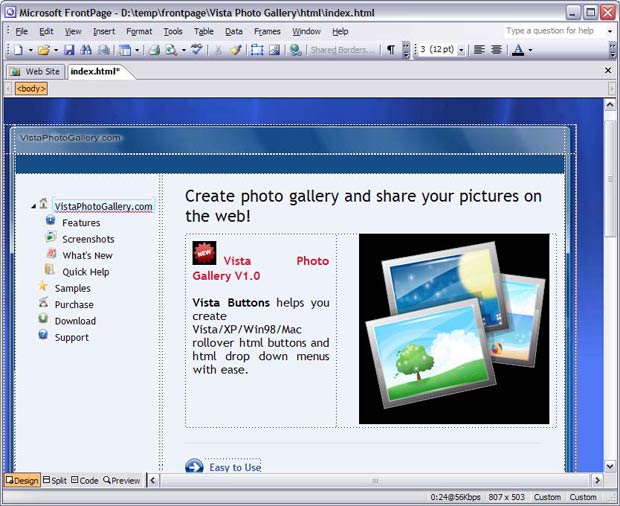
    Insert menu in FrontPage

    - Open the generated in Vista Buttons menu.htmlpage in any text editor. Copy all code within the following tags:
          <!-- Begin Vista-Buttons.com -->
            ...
          <!-- End Vista-Buttons.com -->

    - Go back to FrontPage. In the Design mode decide where you would like the dropdown menu to appear in your page. It helps you add the menu code in the correct place. We have decided to place it at the top of the page. Click in the spot you want the code to appear in and type the phrase: your code here
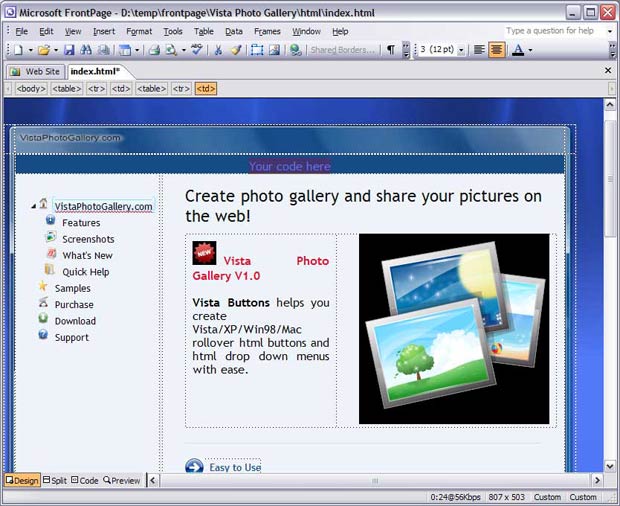
    Insert menu in FrontPage

    - We will now be inserting the JavaScript code into the body section right where we typed the phrase in the previous step. To do this, switch to HTML View.
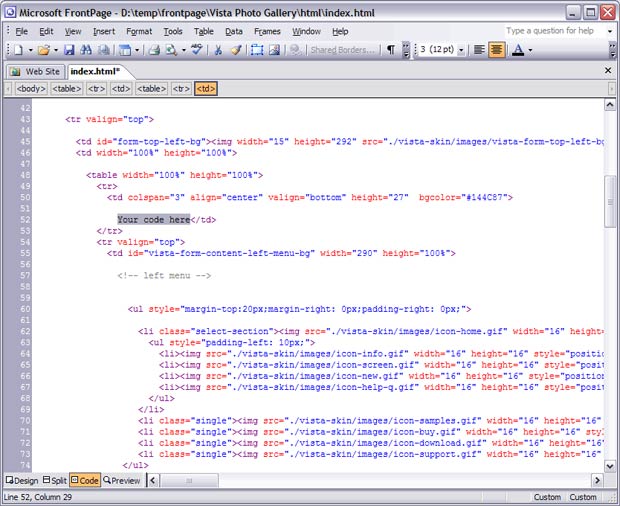
    Insert menu in FrontPage

    - Go to the "Edit Menu" with FrontPage and select the "Paste" option to paste the menu code that we copied to the clipboard earlier. Since the phrase we typed was highlighted, it will be replaced when we paste the code in.
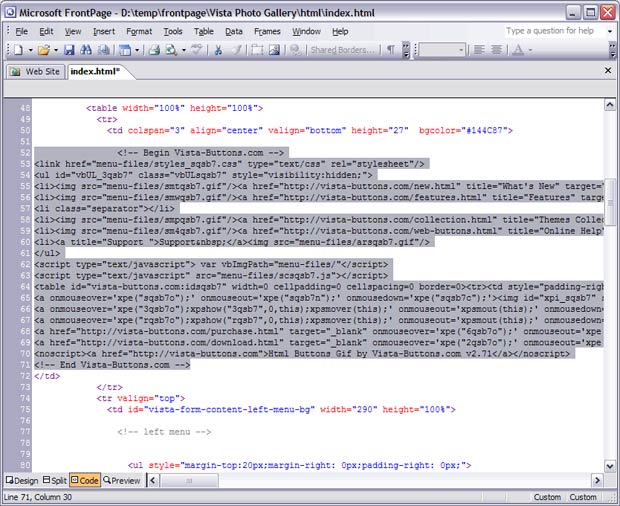
    Insert menu in FrontPage

    - Now you should copy the "menu-files" folder into the same folder with your index.html page.
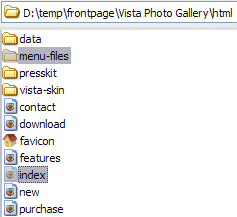
    Copy menu files in FrontPage

    - Notice that in the Design mode your menu may be displayed not in the proper way. It is normal. You should view the menu in the Preview mode.
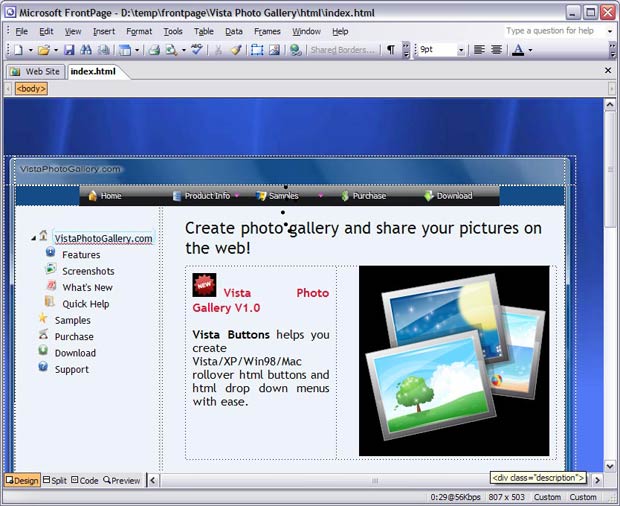
    Design mode in FrontPage

    - That's all. You've added all necessary code to your page, so let's test it. Select the Preview mode to display the page live (in Internet Explorer).
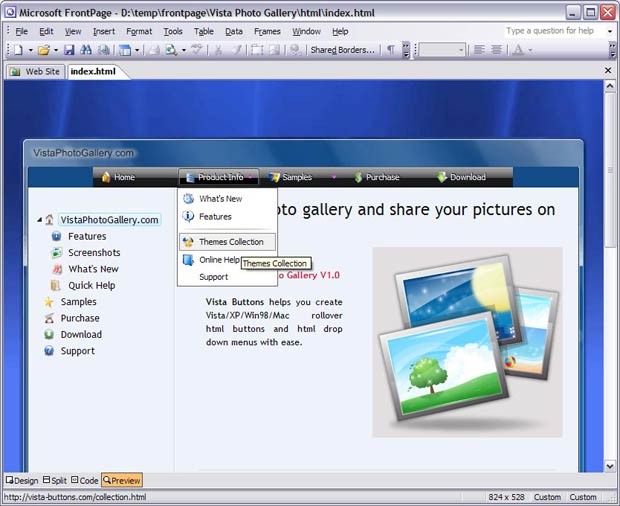
    Result

    - If everything goes well, save your document and upload it and the "menu-files" folder to your web site. If something seems wrong, double-check that you followed all the steps correctly.

    - If you still run into trouble, we'd be happy to assist you further. You can post your problem to us at , and meanwhile describe your files in details.



Support

Please contact Customer Support at (please include template name in the message title)


FAQ


See also

Likno Software Blog Drop-Down Menus, Javascript Menus, DHTML November 20th, 2007 My submenu is not appearing over a flash element. What can I do? Download and extract this file in the folder where this page is in your server.

Front Page - Health promoting hospitals in Finland Current page is: Front Page; Members ; Contact Us ; Submenu Front Page. The purpose of The association of Health

About Home Front Page; About Tell me more; Commercials Video Ads You can create as many pages like this one or sub Submenu. Home; About; Commercials; Slides; Tutorials; Contact

NG BBS When Does It Get On Front Page? If you've submitted a couple of movies before, chances are you'll get labelled as a "popular artist" and will be credited in the submenu below the front page that's

Nordiskt v�gforum NVF - English Front page Submenu Bookmark Page Mail Page Print Page

Zeropanic Front Page Extensions Mailing Lists Autoresponder E-mails Bandwidth and Traffic Statistics Password Protected Folders Advanced Control Panel

How To Add Menu And Submenu In Html. Web Menu How To Don't worry about the bandwidth, in fact I have a little menu on my top page elements on IE7, but i tried almost everything and i "content" shows in front of submenu.

Battles: Front Page Exposure - BioRUST Forums FORUMS SUBMENU stage to remain in the list of Recently Created Battles on the BioRUST Front/Home page?

Contact our sales or techncal support representatives Copyright Notice Worldwide All Rights Reserved 2005-2010 www.frontpage-web-hosting.us, www.front-page-web-hosting.us and www.front-page-web-hosting-service.com

What Is TMTS? Home Front Page; About Tell me more; Commercials Video Ads Submenu. Home; About; Commercials; Slides; Tutorials; Contact; Pages. About; Commercials; Contact; Powerpoint Slides; What Is

Product < levitesproduction.com Levites Production. All rights reserved.

What Is TMTS? Home Front Page; About Tell me more; Commercials Video Ads Submenu. Home; About; Commercials; Slides; Tutorials; Contact; Pages. About; Commercials; Contact; Powerpoint Slides; What Is

Christmas menu CHRISTMAS PAGES - SUBMENU. You can access my Christmas related pages through this submenu. I didn't want to have lots of Christmas links on the front page all the time..

TRS Forms for Active Members Certain TRS forms on this Web site have multiple pages and must be printed on separate pages. Sometimes during processing at TRS, the front and back pages of

Christmas menu CHRISTMAS PAGES - SUBMENU. You can access my Christmas related pages through this submenu. I didn't want to have lots of Christmas links on the front page all the time..

Front Page Frames Question - Bob Dunsire Bagpipe Forums Front Page Frames Question target page overwrites the entire right side of the screen .I lose the submenu